Snipclip 2.0 is here

Hit record.
We'll do the rest.

Capture your screen, camera, or both. Right from your browser.

Record, edit, share. That's it.

No complicated setup. No software to install. Just open your browser and go.

1

Choose your source

Record your screen, webcam, or both at the same time. Pick the layout that works for you.

2

Hit record

Start recording in 4K quality. No watermarks, no time limits. Pause and resume as needed.

3

Download or share

Save locally or upload to cloud. Share with a link, add captions, or export for social.

Snipclip Pro

More than just screen recording

Edit, enhance, and share your videos with powerful tools built right into your browser.

Video Editor

Edit without leaving your browser

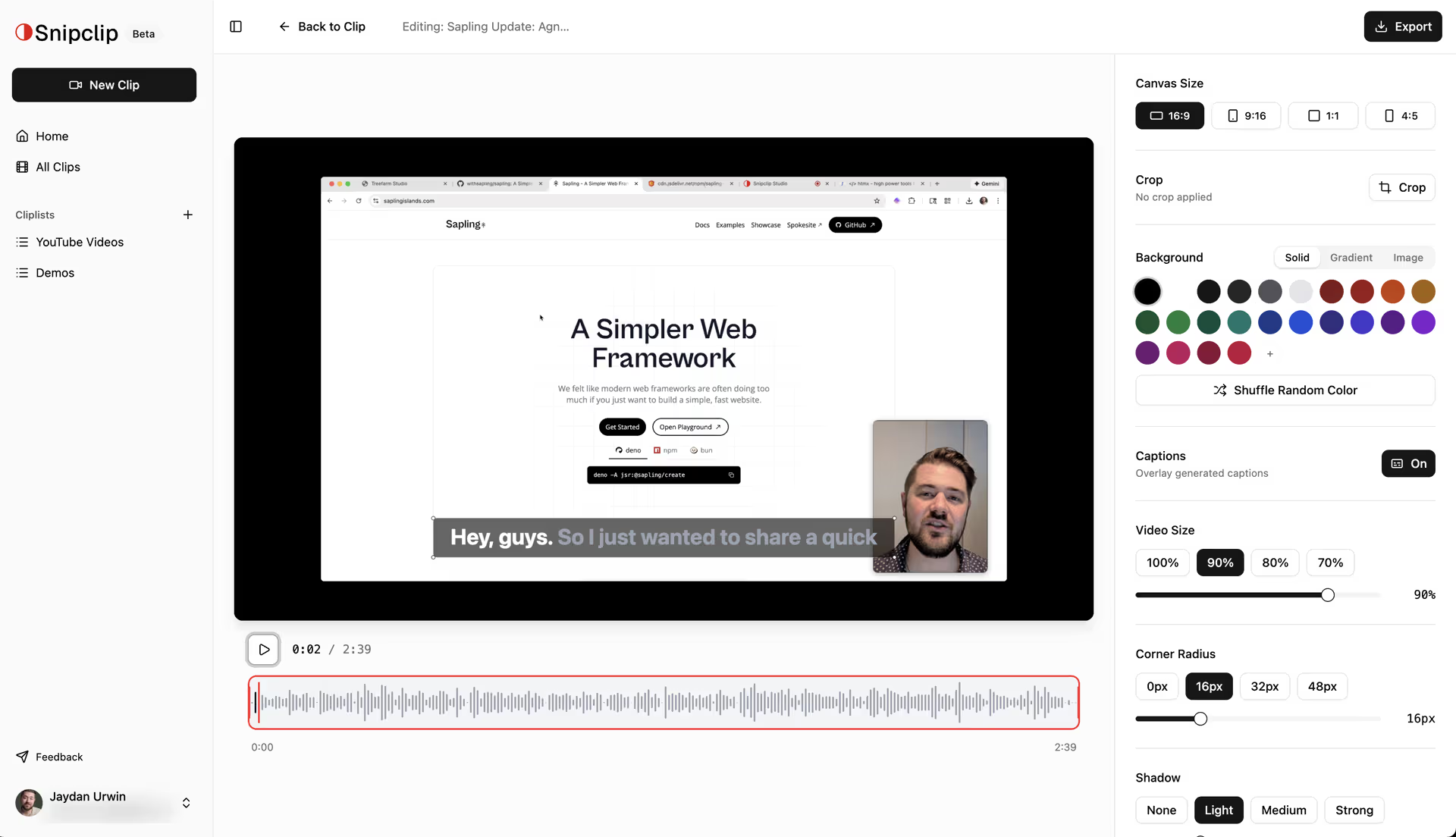
Trim clips, cut out mistakes, crop to any aspect ratio, and add custom backgrounds. Our browser-based editor handles it all—no software downloads required.

  • Trim and cut with precision
  • Crop and resize for any platform
  • Custom backgrounds and styling
Snipclip video editor with AI captions
AI-generated captions with word highlighting
AI Captions

Captions that follow along

Auto-generate accurate captions with word-by-word highlighting. Your viewers can follow along even with the sound off—perfect for social media.

  • Automatic transcription
  • Word-by-word highlighting
  • Editable and customizable
Reframe

One recording, every platform

Recorded in landscape? Export for TikTok, Instagram Reels, or YouTube Shorts with one click.

  • 16:9, 9:16, 1:1, and more
  • Custom crop positioning
  • Export optimized for each platform
16:9
1:1
9:16

Free forever. No catch.

Record unlimited 4K videos with no watermarks, no time limits, and no signup required.

4K Recording

Crystal clear quality

No Time Limits

Record as long as you need

No Watermarks

Your videos, your brand

Local Download

Files stay on your device

Simple, transparent pricing

Start free, upgrade when you need more.

Free

$0/month

Perfect for getting started

  • Unlimited 4K recording
  • No watermarks
  • Screen + camera recording
  • 8 free video tools
Get Started Free
MOST POPULAR

Pro

$9/month

For serious creators

  • Everything in Free
  • In-browser video editor
  • AI captions with highlighting
  • Reframe for any platform
  • Cloud storage & sharing
Upgrade to Pro

Frequently Asked Questions

Everything you need to know about Snipclip.

We believe everyone should be able to record, edit, and share video online effortlessly.
Snipclip is a suite of free video tools that run entirely in your browser. We offer screen and camera recording, video trimming, format conversion, and more. Pro users get access to cloud storage, instant sharing, and automatic transcription. All tools are designed to be fast, private, and easy to use—no downloads or account required for basic features.
Snipclip Record allows you to easily record your screen, camera, or both simultaneously. These recordings can be used for online tutorials, education, showing rather than telling a friend or coworker what is happening on your screen, etc. The best part of the Record tools is that works completely in your browser locally on your machine, meaning there are no downloads, chrome extension installs, or account signups required. It downloads a .webm file
This is the file format the browser uses to natively create recordings. It is a modern video format meaning not every video editing application supports it; however, it is very widely supported in chat apps, YouTube, social media sites, etc. If you need to convert your video to a different format, you can use our free video converter tools.
Since Snipclip is using cutting edge desktop browser features not all of them are available on browsers for mobile phones. The good news is that we are working on a mobile app for both iOS and Android. If you'd like to join the private beta for that when it is released you can sign up here.
For the same reason mobile browsers are not yet supported you might notice not all desktop browsers are supported. We support the latest version of Firefox, Chrome, Edge, and Brave. Of the major browsers Apple's Safari would be the most widely used that does not have the features available for Snipclip to work properly.
Nope! Just as long as you have the storage available on your computer you can record as long as you'd like.
Also nope! We don't want someone else's logo on our videos so we figure why should we force you to?
Free Tools

8 video tools. All free.

Compress, convert, trim, rotate, and more. Every tool runs in your browser— no uploads, no waiting, no limits.

Explore Free Tools

Ready to start recording?

Join thousands of creators using Snipclip to record, edit, and share videos.